Discover how Dynamics 365 Business Central mirroring works in Microsoft Fabric: benefits, costs, and how it simplifies data ingestion into OneLake.
Integrating Dynamics 365 Business Central with Microsoft Fabric is becoming easier thanks to one of the new capabilities announced at FabCon Europe 2026: native Business Central mirroring to OneLake.
This feature enables organizations to replicate ERP data into Microsoft Fabric without having to build and maintain complex, custom data ingestion pipelines.
But how does it compare with traditional integration methods? What benefits does it offer for enterprise analytics, and what limitations should organizations consider?
In this article, we explain how Business Central mirroring works, the opportunities it creates for businesses, and when it makes sense to adopt it.
What Is Business Central Mirroring in Microsoft Fabric?
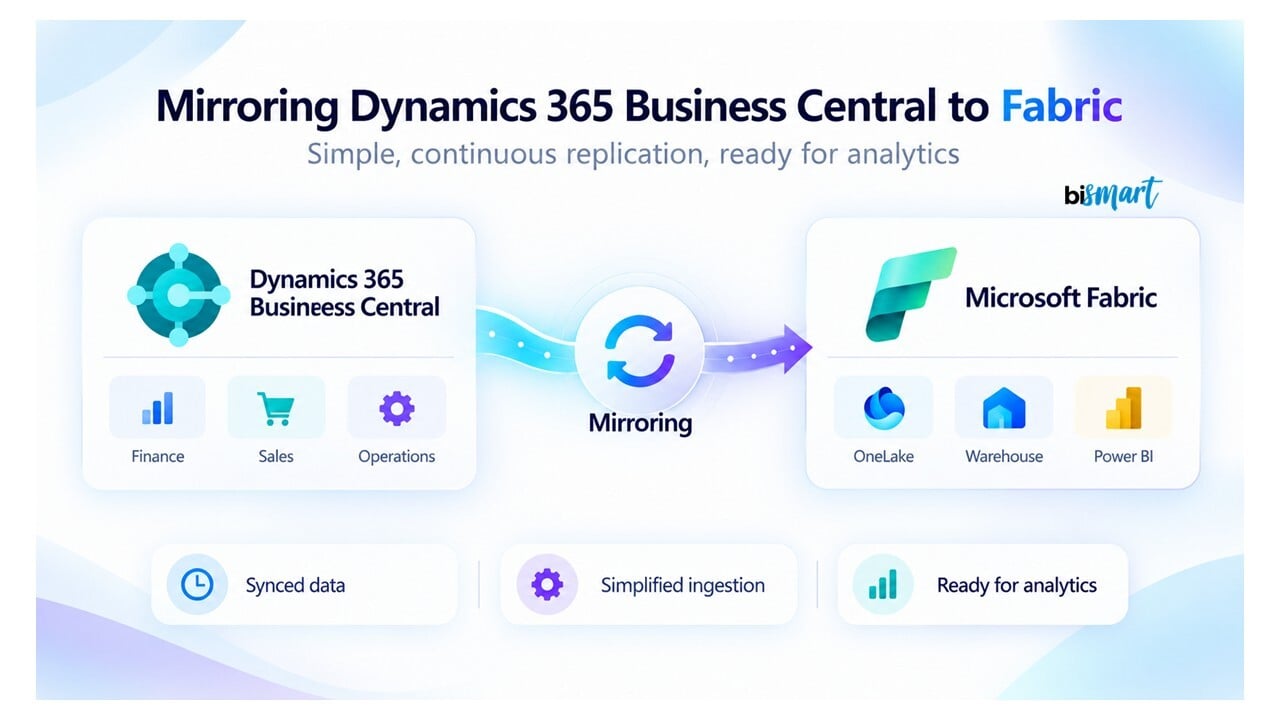
Business Central mirroring in Microsoft Fabric enables organizations to replicate selected tables and company data from Dynamics 365 Business Central directly into OneLake, Microsoft Fabric's unified data lake.
Its main purpose is to simplify data ingestion and make operational ERP data available for analytics without requiring teams to develop and maintain a custom replication solution from scratch.
Announced by Microsoft at FabCon and SQLCon Barcelona 2026, this native integration expands the ways organizations can connect their ERP systems to Microsoft Fabric. It also introduces monitoring capabilities and detailed logs to help teams track replication activity and troubleshoot potential issues.
The significance of this announcement goes beyond connecting two Microsoft products. It is about reducing the effort required to make transactional ERP data available for analytics, data engineering, and artificial intelligence.
To understand why this matters, it helps to distinguish between the role of an ERP system and that of an analytics platform.
Dynamics 365 Business Central is designed to manage day-to-day business operations, including invoices, orders, customers, suppliers, products, and financial transactions. Microsoft Fabric, on the other hand, allows organizations to combine that information with other data sources, transform it, and use it to build analytical models and reports.
Mirroring simplifies the connection between these two environments.
Business Central Joins OneLake's Expanding Integration Ecosystem
The introduction of Dynamics 365 Business Central mirroring is part of Microsoft's broader efforts to make Fabric a unified analytics platform capable of integrating data from a wide range of enterprise systems.
At FabCon Europe 2026, Microsoft announced advances in OneLake connectivity involving technologies such as Google BigQuery, Snowflake, Salesforce, and Dynamics 365 Business Central.
These integrations rely on different approaches, including data replication, shortcuts, and zero-copy data sharing. While the underlying technologies differ, they share a common goal: making enterprise data easier to access and analyze in Microsoft Fabric while reducing integration complexity.
For organizations running Business Central, native mirroring is particularly relevant because it provides a managed way to bring operational ERP data into Fabric's analytics ecosystem.
To learn more about the underlying storage architecture, read our article on what OneLake is in Microsoft Fabric and how it works.
How Does Business Central Mirroring to OneLake Work?
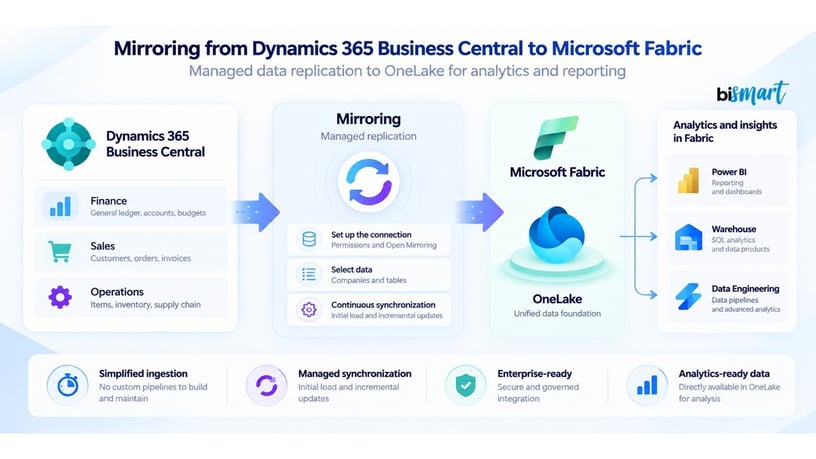
Business Central mirroring uses a managed integration process to replicate selected ERP data into OneLake and keep it synchronized with the source system.
This gives Microsoft Fabric access to an analytical copy of operational data without requiring organizations to build an entirely custom extraction and loading process.
The workflow involves five main steps:
- Prepare Microsoft Fabric: Create a database using Open Mirroring within a Microsoft Fabric workspace.
- Configure Business Central: Establish the connection between Business Central and Fabric, including the required permissions and credentials.
- Select the data: Choose the Business Central companies and tables to replicate.
- Replicate and synchronize: Business Central transfers the initial dataset and subsequent changes to OneLake through the managed replication service.
- Use the data for analytics: The replicated data becomes available to supported Fabric experiences, including Power BI and data engineering tools.
Unlike a traditional integration approach, the data engineering team does not need to develop the entire replication mechanism from scratch. Much of the synchronization process is handled by the integration, allowing technical teams to focus more on how the data will be used.
It is also important to clarify that mirroring does not mean every report queries Business Central's transactional tables directly.
Instead, Microsoft Fabric maintains an analytical copy of the data in OneLake. This separates analytical workloads from day-to-day ERP operations, although organizations still need to monitor data freshness and quality.
Want to See How Business Central Mirroring Fits into a Modern Data Architecture?
Business Central Mirroring vs. Traditional Data Integration: What's the Difference?
The main difference between native Business Central mirroring and traditional data integration lies in the amount of development and maintenance required to bring ERP data into Microsoft Fabric.
With a conventional integration approach, data teams typically need to design and manage data extraction, loading, refresh schedules, and error handling.
This may involve Business Central APIs, Azure Data Factory, Fabric Data Factory, or custom data pipelines.
Although these methods offer considerable flexibility, they also introduce additional responsibilities. Teams must manage credentials, account for API limits, detect data changes, schedule updates, and troubleshoot failed data loads.
With native mirroring, much of the replication and synchronization logic is managed by the integration itself. Selected data is replicated into OneLake, reducing the need to build and maintain custom ingestion processes.
Native Mirroring vs. Traditional Integration: Key Differences
| Aspect | Native Mirroring | Traditional Data Integration |
|---|---|---|
| Data ingestion | Managed replication into OneLake | Extraction and loading through APIs, pipelines, or other methods |
| Synchronization | Managed by the integration | Defined and maintained by the technical team |
| Development effort | Less custom replication code | Greater flexibility, but typically more development |
| Maintenance | Less maintenance of the ingestion process | Ongoing monitoring and maintenance of custom processes |
| Data transformations | Typically handled in downstream analytical processes | Can be incorporated into the integration pipeline |
| Customization | Subject to the integration's supported capabilities and limitations | Greater control over extraction and transformation rules |
However, Business Central mirroring does not replace every data integration or transformation process. Its primary role is to simplify the replication of ERP data into OneLake.
Organizations that need to combine multiple data sources, apply business rules, standardize information, or build analytical models may still rely on technologies such as Fabric Data Factory, Spark, SQL, or Power BI.
In fact, the two approaches can complement one another.
Mirroring can keep source data available in OneLake, while other Microsoft Fabric capabilities transform and prepare that data for reporting and advanced analytics.
The right approach depends on the integration requirements. If the priority is to simplify Business Central data replication, mirroring can significantly reduce technical effort. If the project requires highly customized extraction logic or complex transformations, additional tools or a custom integration may still be necessary.
What Are the Benefits of Business Central Mirroring?
Business Central mirroring helps organizations build a more integrated and manageable data architecture within Microsoft Fabric.
Its value lies in reducing repetitive technical tasks and establishing a shared foundation for enterprise analytics.
The main benefits include:
- Simpler data ingestion: Reduces the need to develop and maintain custom data replication mechanisms.
- Native Microsoft Fabric integration: Makes ERP data available in OneLake for use across compatible Fabric workloads.
- Fresher data for analytics: Managed synchronization helps organizations access more recent operational information without relying exclusively on custom scheduled data loads.
- Built-in monitoring: Provides replication status information and detailed logs to help identify and investigate issues.
- Greater analytical scalability: Makes it easier to expand the analytical use of Business Central data without rebuilding the underlying ingestion infrastructure for every new use case.
These benefits are particularly valuable when Business Central serves as a core source of enterprise data and needs to be connected with other business applications, databases, or reporting systems.
However, scalable data replication does not automatically guarantee reliable analytics.
Even when data ingestion is managed, the accuracy of KPIs, the consistency of analytical models, and the correct application of business rules remain the responsibility of the data team.
What Can You Do with Business Central Mirroring?
By making operational ERP data available in Microsoft Fabric, Business Central mirroring enables a broader range of analytics use cases, from financial reporting to sales performance analysis and inventory optimization.
How Does Business Central Mirroring Improve Financial Reporting?
Mirroring makes financial and commercial data available in OneLake, where it can be used to build analytical models that bring together different aspects of business performance.
For example, organizations can develop reports covering sales, margins, revenue, invoicing, customer performance, and financial KPIs, combining this information with budgets and commercial targets.
Rather than relying exclusively on the ERP's built-in operational reports, finance and business teams can create analytical models and dashboards tailored to management and decision-making needs.
How Does It Support Sales and Inventory Analytics?
Business Central data relating to orders, products, customers, and inventory movements can be analyzed together to identify sales trends, inventory turnover, demand patterns, and commercial performance.
When organizations also collect information from e-commerce platforms, logistics systems, or CRM applications, Microsoft Fabric allows these sources to be integrated into a broader analytical environment.
The result is a more comprehensive view of business performance than any individual system can provide on its own.
How Can Business Central Mirroring Support AI Projects?
Once Business Central data is available in OneLake, organizations can combine it with additional datasets to support predictive analytics, machine learning models, and AI-powered applications.
For example, a company could develop a demand forecasting model using historical sales, inventory levels, and external variables.
Mirroring makes the operational data easier to access, but it does not automatically build predictive models or ensure that the underlying datasets are suitable for AI.
Data preparation, validation, and analytical modeling remain essential to developing reliable AI solutions.
What Role Does OneLake Play in Business Central Mirroring?
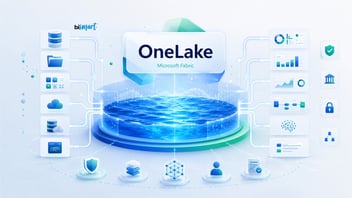
OneLake is Microsoft Fabric's unified data storage layer, providing a shared foundation for the platform's analytics workloads.
In Business Central mirroring, OneLake acts as the destination for replicated ERP data, making that information available for downstream analytics.
Microsoft Fabric uses open data formats such as Delta Lake, built on Parquet, to support interoperability across different processing engines.
This reduces dependence on any single reporting tool and allows organizations to work with the same underlying data using multiple analytical technologies.
Once replicated into OneLake, Business Central data can be used in lakehouses, notebooks, data engineering processes, and Power BI semantic models, depending on the requirements and supported capabilities of the solution.
One of the main architectural advantages is the separation of data ingestion from data consumption.
The process responsible for keeping source data synchronized does not need to be the same process that calculates KPIs, prepares analytical tables, or generates reports.
For example, an organization could replicate Business Central data into OneLake, transform it in a lakehouse using Spark or SQL, and build a Power BI semantic model that provides financial insights to business stakeholders.
For a closer look at this architecture, explore our article on how Microsoft Fabric Lakehouse works and its benefits for data integration and analytics.
This separation also makes it easier to extend the solution over time. Organizations can develop additional analytics use cases using the same replicated ERP data without necessarily creating a separate integration for each one.
From Operational Data to Analytics: A Real-World Lakehouse Case Study
Replicating data into OneLake is only the first step. The next challenge is turning that information into reliable, traceable, and reusable datasets.
Discover how Bismart implemented a Medallion Lakehouse architecture to integrate multiple data sources, improve data quality, and accelerate the delivery of business insights.
What Are the Costs and Limitations of Business Central Mirroring?
Although Business Central mirroring in Microsoft Fabric simplifies data replication, organizations still need to assess the technical requirements, functional limitations, and associated costs before adopting it.
The main considerations include:
- Availability and compatibility: Check whether the integration is available in your Business Central environment and whether the required versions, permissions, and Fabric capacity are in place.
- Data selection: Confirm which ERP tables and structures can be replicated, particularly when using extensions or customized configurations.
- Synchronization latency: Assess how frequently the data is updated and whether that meets the requirements of your reports and analytics workloads.
- Microsoft Fabric costs: Account for capacity consumption, storage, and the processing resources needed to transform, query, and analyze the data.
- Data governance and security: Define access permissions and protection measures for financial, commercial, and personal information stored in OneLake.
- Analytical data preparation: Determine whether additional transformations or analytical models are required before the replicated data can be used effectively.
A cost assessment should consider the total cost of ownership, including configuration, operations, monitoring, storage, and analytical workloads, alongside potential savings in custom development and ingestion maintenance.
Is Business Central Mirroring Available in Microsoft Fabric?
Native Dynamics 365 Business Central mirroring was introduced as a preview feature, with access subject to Microsoft's availability conditions and technical requirements.
Because the feature is still evolving, organizations should verify its current release status before planning a production deployment.
Requirements for Business Central Mirroring
According to Microsoft's preview configuration documentation, the integration requires:
- Dynamics 365 Business Central online, version 29.0 or later.
- The Microsoft Fabric Mirroring extension installed in Business Central.
- An active Microsoft Fabric capacity.
- The appropriate administrative permissions to configure the integration.
- A Microsoft Entra ID app registration, as described in the preview setup process.
- A Microsoft Fabric workspace within the same Microsoft Entra tenant as Business Central.
As the functionality develops, organizations should verify the current access conditions, configuration requirements, and known limitations before implementing it in production.
For the latest technical details, refer to the official Microsoft documentation on setting up Fabric mirroring for Business Central.
When Should You Use Business Central Mirroring in Microsoft Fabric?
Business Central mirroring is particularly useful when an organization wants to replicate ERP data into Microsoft Fabric with less custom development and keep it available for multiple analytical use cases.
However, it may offer fewer advantages when the integration requires extensive transformations before ingestion or highly specific extraction logic.
As a general guideline:
- Choose native mirroring when your priority is to simplify Business Central data replication into OneLake and reduce ingestion maintenance.
- Combine mirroring with Data Factory or Spark when you need to transform, enrich, or integrate the replicated data with other sources.
- Consider a custom integration when the native functionality does not support your requirements, such as specialized extraction rules or incompatible data structures.
The best data architecture is not necessarily the one that uses the most native features.
It is the one that meets the organization's business requirements with the least unnecessary complexity, while maintaining control over data quality, security, and costs.
Frequently Asked Questions About Business Central Mirroring
Does Business Central Mirroring Use ERP APIs?
No. Native Dynamics 365 Business Central mirroring uses an internal replication service to transfer data into Microsoft Fabric rather than relying on the ERP's standard APIs.
As a result, synchronization does not consume Business Central API request limits, unlike certain custom integration approaches that use those APIs to extract data.
Which Business Central Tables Can Be Replicated into Microsoft Fabric?
Mirroring supports standard Business Central tables and extension tables stored in the ERP's SQL database.
Organizations can select which companies and tables to synchronize with OneLake. However, individual fields cannot be selected within a table: all fields belonging to a selected table are included in the replication.
According to Microsoft's preview documentation, organizations can select up to 1,000 tables per tenant. This limit may change in future releases.
Does Business Central Mirroring Sync Data to OneLake in Real Time?
Business Central mirroring supports near-real-time data synchronization, but it does not guarantee instantaneous updates.
Microsoft indicates that incremental changes are typically synchronized within minutes, although actual latency depends on the frequency of changes and the conditions of the replication process.
The initial historical data load may take longer than subsequent updates. Organizations should therefore validate synchronization times before relying on the replicated data for time-sensitive analytics.
What Happens When Records Are Deleted in Business Central?
Business Central mirroring also supports the replication of deleted records.
This means the analytical copy can reflect newly created records, updates to existing data, and deletions made in the source ERP system.
Keeping these changes synchronized helps maintain consistency between Business Central's operational data and its analytical representation in Microsoft Fabric.
Do You Need an Additional Business Central License for Mirroring?
According to Microsoft's documentation, Business Central does not charge an additional license or consumption fee specifically for mirroring.
However, organizations must have an active Microsoft Fabric capacity, and the applicable capacity and other usage-related costs still need to be considered.
The overall cost will therefore depend on the provisioned Fabric capacity and the resources used to store, process, and analyze the replicated data.
Can You Mirror Data from Multiple Business Central Companies?
Yes. Business Central mirroring supports the selection of multiple companies and tables for synchronization with Microsoft Fabric.
The configuration is managed at the Business Central environment level, meaning each environment must be configured separately.
This is particularly valuable for organizations operating multiple legal entities that need to consolidate financial, sales, or operational data within a shared analytics platform.
Conclusion: What Does Business Central Mirroring Mean for the Future of Microsoft Fabric?
The introduction of native Dynamics 365 Business Central mirroring in Microsoft Fabric marks another step toward closer integration between enterprise resource planning systems and modern data analytics platforms.
For organizations using Business Central, it simplifies access to financial, commercial, and operational information through OneLake, where that data can be combined with other sources to support business intelligence, advanced analytics, and AI applications.
Its most significant contribution is the potential to reduce the technical effort involved in replicating and maintaining ERP data, allowing data teams to spend more time developing analytical solutions that deliver business value.
However, adopting mirroring should not be an objective in itself.
The decision should be based on each organization's needs: which data it needs to analyze, how frequently that information must be updated, which systems need to be integrated, and what technical requirements and costs are involved.
The real value of Business Central mirroring lies not simply in connecting an ERP to Microsoft Fabric, but in making operational data more accessible and useful for better business decisions.
To discover other capabilities announced alongside this integration, read our overview of the key Microsoft Fabric announcements from FabCon Europe 2026.
Integrate Dynamics 365 Business Central with Microsoft Fabric: How Bismart Can Help
Replicating Business Central data into OneLake is only the beginning. To turn that data into meaningful business insights, organizations need an architecture that brings together data integration, quality, security, and accessibility.

As a Microsoft Solutions Partner for Cloud & AI Platforms and a Fabric Featured Partner, Bismart helps organizations make the most of Microsoft Fabric across the entire data lifecycle:
- Enterprise data integration: We connect Business Central with other platforms, including SAP, Dynamics 365, Salesforce, and Azure, to create a unified view of business data.
- Data architecture and governance: We design solutions built on OneLake, Lakehouse, and Data Warehouse architectures, incorporating data quality controls, security policies, and access management.
- Proprietary accelerators: We use solutions such as our Data Integration Framework and Data Quality Framework to streamline integration processes and improve data reliability.
- Business analytics with Power BI: We turn operational data into semantic models, KPIs, and dashboards for finance, sales, operations, and executive teams.
- Artificial intelligence and automation: We prepare enterprise data for predictive models, AI agents, and advanced analytics applications.
With over 15 years of experience in Data & AI, Bismart supports organizations from initial architecture design through implementation and ongoing optimization.
Explore our Microsoft Fabric consulting services and discover how we can help you integrate, govern, and unlock the value of your enterprise data.