Compare Azure Databricks Standard vs Premium and learn the key differences in security, governance, pricing, and architecture before the 2026 transition.
As the transition from Azure Databricks Standard to Azure Databricks Premium approaches, many organizations are reviewing the differences between these two tiers and assessing what this change may mean for their data architecture.
Starting on April 1, 2026, it will no longer be possible to create new workspaces in the Standard tier, and all existing environments will be automatically upgraded to Azure Databricks Premium on October 1, 2026.
This means that in the coming months, many companies will begin evaluating the additional capabilities and Databricks Premium features available in the Premium tier and how they can leverage them within their data platforms.
In this context, understanding the differences between Azure Databricks Standard vs Premium becomes essential when planning the evolution of a modern lakehouse architecture, particularly in areas such as Unity Catalog adoption, SQL analytics with Databricks SQL, advanced access control, and serverless compute.
In this article, we analyze the key differences between Azure Databricks Standard and the Azure Databricks Premium tier, the most important capabilities of each level, and the scenarios in which each tier is best suited within a modern data and analytics strategy.
Key takeaways on Azure Databricks Standard vs Premium
- Azure Databricks Standard is designed for development environments or relatively simple workloads with limited security and data governance requirements.
- Azure Databricks Premium introduces enterprise capabilities such as Unity Catalog, granular RBAC access control, Databricks SQL with SQL Warehouses, and serverless compute options.
- Premium enables organizations to build modern lakehouse architectures, where data engineering, SQL analytics, and machine learning operate on the same platform.
- Microsoft will retire the Databricks Standard tier, and all workspaces will be automatically upgraded to Azure Databricks Premium on October 1, 2026.
- The transition is unavoidable: organizations can either plan a Databricks Standard to Premium migration to take advantage of Premium capabilities or wait for the automatic upgrade, which may increase costs without optimizing the platform.
If you are evaluating what it really means to move from Azure Databricks Standard to Premium, we have documented a real migration case study carried out in an enterprise data platform.
In the case study, you will see how an organization using Databricks together with Azure Synapse evolved its architecture toward the Databricks Premium tier to strengthen data governance, security, and operational efficiency, while simplifying its analytical environment.

Azure Databricks Premium vs Standard: Key Differences
The main difference between Azure Databricks Standard and the Premium tier is that Premium introduces advanced enterprise capabilities —such as Unity Catalog, granular access control (RBAC), Databricks SQL with SQL Warehouses, and serverless compute options— that are not available in the Standard tier.
Understanding the differences between Azure Databricks Standard vs Premium is essential when planning the evolution of a modern lakehouse architecture.
The following table summarizes the most important differences between these two tiers.
Databricks Standard vs Premium: Feature Comparison
| Aspect | Standard Tier | Premium Tier |
|---|---|---|
| Overview | Basic tier suitable for development environments or simple workloads, with limited governance capabilities. | Full enterprise platform with advanced governance, stronger security, and integrated analytics capabilities. |
| Security and access control | Basic permission model within the workspace, without granular RBAC. | Advanced role-based access control (RBAC) for notebooks, clusters, jobs, and other workspace resources. Supports IP access lists and private workspace access (Private Link). |
| Data governance | Limited: no Unity Catalog and no built-in data lineage. | Unity Catalog with automatic data lineage, catalog-level permissions, centralized access control, and auditing to support compliance requirements. |
| Analytics and BI tools | No Databricks SQL workspace (SQL endpoints are not available in Standard). Requires external tools such as Azure Synapse for SQL queries and reporting. | Includes Databricks SQL and SQL Warehouses, an optimized analytics engine for SQL queries, native dashboards, and serverless execution. External BI tools (such as Power BI) can connect directly to Databricks as a SQL database. |
| Collaboration | Standard notebooks and basic cluster sharing. Lacks advanced collaboration features. | Enhanced collaboration, including Databricks SQL dashboards for sharing insights. Better suited for large teams with enterprise-level permissions management and monitoring. |
| Typical use cases | Best for small-scale workloads, development/test environments, or non-critical scenarios where cost is the main priority and governance needs are minimal. | Designed for enterprise data platforms, multi-team environments, sensitive data, compliance requirements, and large-scale production workloads. |
| Pricing (DBU cost) | Lower DBU pricing. For example, around $0.40 per DBU for an all-purpose compute cluster (varies by region). | Typically 20–30% higher DBU cost than Standard. For example, around $0.55 per DBU for the same all-purpose compute configuration. (The Enterprise tier is higher, roughly $0.65 per DBU.) |
| Networking and integration | Basic VNet integration, but without native support for secure cluster connectivity features. | Advanced network security, including VNet injection, secure cluster connectivity, Private Link, and other enterprise networking capabilities that allow the workspace to be isolated from the public internet. |
Nota: In Azure, the Databricks Standard tier will remain available for part of 2026, but all workspaces will be automatically upgraded to Azure Databricks Premium on October 1, 2026. This means that the transition to Premium is inevitable. Organizations can either plan a Databricks Standard to Premium migration to take advantage of the new capabilities and optimize their data architecture, or wait for the automatic upgrade, which may increase costs without necessarily benefiting from Premium’s advanced features.
Next, we examine in more detail the differences between Azure Databricks Standard and Premium and how these capabilities influence the design of a modern data architecture.
Azure Databricks Standard vs Premium: Differences, Capabilities and Pricing
1. Role-Based Access Control (RBAC): Workspace Security and Governance
One of the most important Databricks Premium features is the introduction of role-based access control (RBAC). In the Azure Databricks Standard tier, the permission model is far less granular. Within the workspace, there is no native way to restrict who can modify clusters, run jobs, or access notebooks.
This more “open” model can work in small teams or testing environments, but it introduces clear risks in larger organizations or in production workloads.
With Azure Databricks Premium, RBAC allows administrators to define roles, detailed permissions, and specific access levels for notebooks, clusters, jobs, and other workspace resources.
For example, you can limit certain users to only viewing production notebooks, control who can create or modify clusters, or even restrict access to specific tables.
This level of data governance and access control helps prevent unauthorized changes, reduce operational errors, and protect sensitive data—an essential requirement in enterprise environments where security and governance in Databricks workspaces are critical.
2. Unified Data Governance with Unity Catalog
One of the biggest advantages of Azure Databricks Premium for enterprises is access to Unity Catalog, Databricks’ unified data governance and catalog service—a capability that is not available in the Databricks Standard tier.
With Premium, organizations can implement an advanced data governance model across their data platform: defining catalogs, schemas, and tables with controlled permissions; managing complete data lineage; and obtaining detailed audit logs of data access, even at the column level—all within a centralized framework.
This results in improved data discovery, higher data quality, full traceability of data origins and transformations, and stronger regulatory compliance.
Having access to Unity Catalog in Databricks Premium significantly expands the governance, security, and scalability possibilities of a modern data platform.
3. Databricks SQL for Analytics, Business Intelligence and Dashboards
If your team works with data analytics or BI reporting, the Premium tier unlocks Databricks SQL, a dedicated environment for SQL analysts that includes a query editor, native dashboards, and a high-performance execution engine: SQL Warehouses (formerly called SQL Endpoints).
In the Databricks Standard tier, SQL Warehouses are not available, which limits the ability to perform SQL analytics directly within the platform.
As a result, many Standard-tier users rely on external solutions—for example, connecting Power BI directly to Spark clusters or moving aggregated data into separate analytical warehouses.
With Azure Databricks Premium, organizations gain a fully integrated SQL analytics environment:
- Analysts can query Delta tables directly in Databricks.
- Dashboards can be created without relying on additional tools.
- Visuals can be shared within the same workspace environment.
In addition, Databricks SQL Warehouses can be configured in serverless mode, allowing Azure to manage compute automatically on demand.
This reduces operational complexity and accelerates time to insight: analysts, data engineers, and BI teams can work within the same platform, reducing the need for a separate data warehouse for interactive queries.
It also enables the separation of analytical workloads from data engineering pipelines, preventing BI queries from affecting the performance of ETL processes.
This approach reflects the core principle of the Databricks Lakehouse architecture, where data engineering, SQL analytics, machine learning, and BI consumption coexist on a single platform.
Instead of maintaining separate systems —such as data lakes, data warehouses, and independent analytics engines— the lakehouse model consolidates these workloads on a shared storage and compute layer, simplifying architecture and enabling a more modern data platform.
In our experience, this capability is often one of the main reasons organizations consider upgrading to Databricks Premium.
- A real example: a real estate company replaced Power BI reports connected to a Synapse SQL pool with direct queries to Databricks SQL Warehouses, simplifying its analytics architecture. You can explore the full case study here.
4. Network Security, Compliance, and Private Connectivity
For organizations with strict security requirements, the Azure Databricks Premium tier provides several essential capabilities to secure the workspace environment.
One of these is IP access lists, which allow administrators to restrict access to Databricks to specific IP ranges, such as a corporate network or VPN.
Another key feature is private workspace access through Azure Private Link, which ensures that all traffic between users and the Databricks interface travels through a private network rather than the public internet.
This adds an extra layer of isolation and security that is particularly important in enterprise environments.
Combined with detailed audit logs, granular cluster access controls, and improved workspace activity visibility, these capabilities make Databricks Premium a suitable option for organizations that must comply with regulations such as SOC 2, HIPAA, or GDPR.
The Databricks Enterprise tier goes even further by supporting customer-managed encryption keys (CMK), multi-region disaster recovery, and additional compliance certifications such as PCI or FedRAMP.
Together, these capabilities allow organizations to manage resources more securely within an Azure Databricks Premium workspace, including notebooks, clusters, jobs, and analytical workloads.
5. Serverless Compute and Performance Improvements
The Databricks Premium tier also provides more compute options and performance optimizations than the Standard tier.
One of the most important is Databricks serverless compute, a capability available in Premium environments.
Serverless compute allows organizations to run workloads—particularly SQL queries in Databricks SQL and certain notebooks—without provisioning or managing clusters, significantly reducing operational complexity.
This eliminates the overhead associated with cluster provisioning, scaling, and shutdown, while providing nearly instant startup times.
In the Databricks Standard tier, all workloads require manually provisioned clusters, which introduces delays. A typical Spark cluster may take several minutes to start before executing a job.
With Azure Databricks Premium, however:
- Serverless SQL Warehouses start almost instantly.
- Interactive clusters with intelligent autoscaling reduce preparation times.
- Ad-hoc queries and experimentation can run without startup delays.
The difference is noticeable in day-to-day operations: faster development cycles, immediate ad-hoc queries, and significantly less friction for analysts, data engineers, and data scientists.
In addition to serverless compute, Premium also enables advanced performance features such as Delta Live Tables (now part of the Lakeflow environment in Databricks), which allows teams to define data pipelines declaratively with automated optimizations.
Boost Your Workloads with a Modern Data Architecture
Whether you plan to adopt serverless SQL analytics, modernize your lakehouse architecture, or retire legacy workloads, the transition to Azure Databricks Premium can significantly improve performance, governance, and operational efficiency.
Designing a modern Databricks data architecture aligned with best practices helps organizations maximize the value of their data platform while preparing for future analytics and AI workloads.

6. Collaboration and Advanced Productivity Tools
Azure Databricks Premium is designed for larger teams and for projects where collaboration and governance become more complex.
The Premium tier includes capabilities such as granular audit logging, monitoring tools, and access to Databricks Assistant, an AI-powered assistant that was not available in the Databricks Standard tier, along with other advanced AI integrations.
Premium also enables integration with MosaicML for more sophisticated AI and machine learning use cases, as well as additional extensions that expand the capabilities of the Databricks Lakehouse platform.
In addition, it offers more advanced integration with enterprise identity and security solutions, including credential passthrough for storage, ensuring that as teams scale, organizations can maintain control, security, and visibility across their data resources.
By contrast, the Standard tier was designed for lightweight development or smaller-scale use cases, without many of the capabilities required for production environments.
As a result, Azure Databricks Premium is far better suited for large teams and enterprise workflows, incorporating features such as alerts, integrated dashboards, and detailed sharing and permission controls, capabilities that are not available in the Standard tier.
7. Cost, Pricing Differences, and Total Cost of Ownership (TCO) When Moving from Standard to Premium
Moving from Azure Databricks Standard to Azure Databricks Premium typically involves an initial increase in compute costs.
This difference is part of Azure Databricks Premium pricing, where the cost of Premium all-purpose compute DBUs is generally about 20–30% higher than the Standard tier, depending on the region and cluster configuration.
For example, an all-purpose cluster that costs around $0.40 per DBU-hour in Standard may cost approximately $0.55 per DBU-hour in Premium. Job clusters typically follow a similar pattern.
It is important to note that this difference relates specifically to the Databricks platform pricing; the underlying Azure infrastructure costs remain the same in both tiers.
That being said, evaluating the real cost impact goes beyond the price per DBU. Azure Databricks Premium includes capabilities for data governance, automation, and performance optimization that can help reduce unplanned consumption and recurring operational tasks.
Features such as serverless compute and cluster policies help prevent idle usage and allow teams to run workloads with more efficient configurations.
In many scenarios, these optimizations can offset part of the initial price increase.
In addition, Premium can simplify the overall architecture by consolidating components. For example, if Databricks SQL fully covers analytics requirements, organizations may be able to eliminate complementary services —such as an Azure Synapse SQL pool— helping balance the overall investment in the data platform.
There are also benefits that do not always appear directly on the bill but have a real business impact: stronger data security, improved regulatory compliance, and higher productivity for analysts, data engineers, and technical teams.
Taken together, faster access to insights, consolidated tools, and reduced administrative overhead can contribute to a more balanced —or even favorable— total cost of ownership (TCO) over time, despite the higher hourly compute price.
For more accurate planning, tools such as the Azure Databricks pricing calculator and Reserved Capacity discounts (which can reach around 37%) allow organizations to model different scenarios and optimize long-term spending.
If you want to see how these optimizations translate into real savings, you can download the case study of a planned Databricks Standard to Premium migration, which provides detailed insights from a real-world scenario.
Standard vs Premium: What This Change Means for Your Data Platform
In general terms, Azure Databricks Standard is designed for development environments or relatively simple workloads with limited requirements for security, governance, and advanced analytics.
By contrast, Azure Databricks Premium is built for enterprise data platforms and modern lakehouse architectures, where data engineering, SQL analytics, machine learning, and BI consumption share the same technological foundation.
Beyond the functional differences, this transition also creates an opportunity for organizations to reassess how Databricks is used within their data architecture.
Many companies operating on the Standard tier have had to complement the platform with additional services to address requirements such as data governance, SQL analytics, or granular access control.
In this context, moving from Azure Databricks Standard to Premium can become an opportunity to simplify the data architecture, consolidate tools, and adopt capabilities that were not available in the Standard tier.
A Real Example of a Databricks Premium Migration
To illustrate how a data platform can evolve toward Azure Databricks Premium, we documented the process followed by a real estate company that was operating with Azure Databricks Standard and Azure Synapse to serve data to Power BI.
As the platform grew, challenges related to data governance, access control, and architectural complexity began to emerge. Upgrading to Premium helped address these issues while simplifying the organization’s analytics architecture.
You can download the full case study here:
Get to See the Full Migration Guide
In addition to the case study, at Bismart we have developed a Databricks Premium migration playbook that we use in lakehouse platform modernization projects.
This document covers topics such as:
- A structured migration roadmap
- Architecture and data governance considerations
- A simplified TCO model for Databricks Premium
- Common migration pitfalls to avoid during the transition
It is not an open public resource, as it is part of the methodology we apply in real Databricks Standard to Premium migration projects.
If you are evaluating this transition for your Databricks data platform, we can walk you through the full guide and discuss how it applies in real-world architectures:
Databricks Architecture: Standard vs Premium
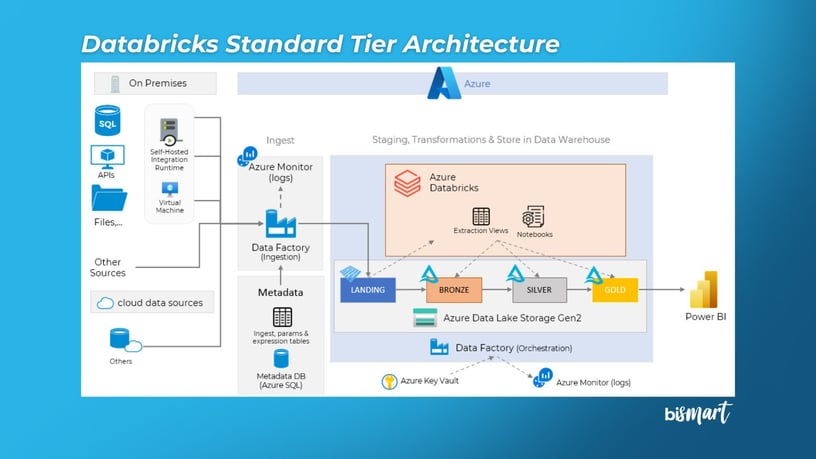
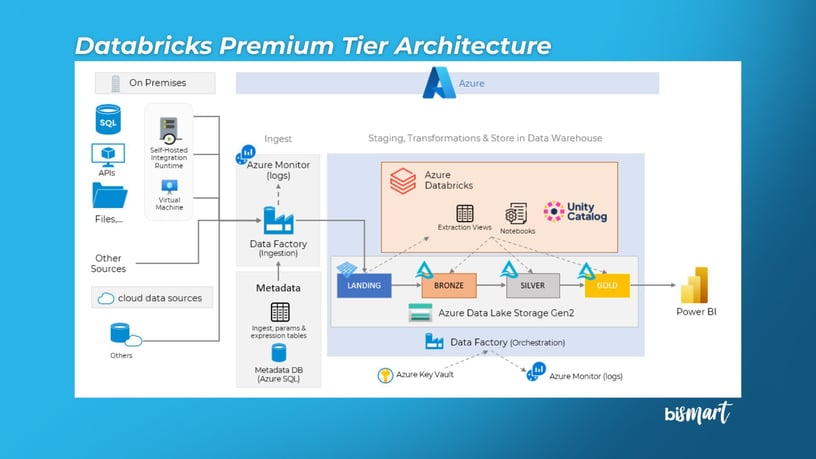
The following diagrams illustrate the structural differences between the Azure Databricks Standard and Premium tiers.
This visual comparison highlights why the Databricks Premium tier provides a stronger foundation for security, data governance, and advanced analytics compared to the Standard tier.
In particular, Premium introduces key components such as Unity Catalog for centralized data governance, SQL Warehouses for optimized SQL analytics and enhanced network security and isolation capabilities.
Databricks Architecture: Standard Tier
Databricks Architecture: Premium Tier
Unity Catalog: Centralized Data Governance in Databricks
Unity Catalog is Databricks’ unified data governance system, designed to centrally manage data security, access control, and data lineage across lakehouse architectures.
This capability is not available in Azure Databricks Standard and requires the Premium tier or higher.
With Unity Catalog in Databricks Premium, organizations can:
- Apply granular permissions to catalogs, schemas, and tables
- Control data access at the column level
- Maintain end-to-end data lineage and traceability
- Strengthen regulatory compliance and governance policies
For this reason, many organizations running Databricks Standard eventually migrate to Databricks Premium in order to implement a centralized data governance model within their lakehouse architecture.
Optimize Your Data Platform with a Proven Integration Framework
If you are modernizing your Databricks data platform, now is the ideal time to strengthen your data ingestion and data governance processes.
Discover how the Bismart Data Integration Framework can standardize, automate, and accelerate your data pipelines.

Frequently Asked Questions About Azure Databricks Standard vs Premium
What is the difference between Azure Databricks Standard and Premium?
The main difference between Azure Databricks Standard and Premium is that the Premium tier includes advanced capabilities for security, data governance, and analytics, such as Unity Catalog, granular access control (RBAC), Databricks SQL with SQL Warehouses, and serverless compute.
These capabilities enable organizations to build enterprise data platforms based on lakehouse architecture, while the Standard tier is more suitable for development environments or simpler workloads.
What additional features does Azure Databricks Premium provide?
Azure Databricks Premium includes several capabilities that are not available in the Standard tier, including:
- Unity Catalog for centralized data governance
- Granular role-based access control (RBAC) for workspace resources
- Databricks SQL and SQL Warehouses for optimized SQL analytics
- Serverless compute for running queries and workloads without managing infrastructure
- Advanced network security and auditing capabilities
These features are designed for enterprise environments and modern lakehouse architectures.
What type of workloads is each tier designed for?
In general terms:
- Azure Databricks Standard is suitable for development environments, testing, or relatively simple workloads with limited governance requirements.
- Azure Databricks Premium is designed for enterprise data platforms, where stronger security, access control, advanced analytics, and team collaboration are required.
Is Azure Databricks Premium required to use Unity Catalog?
Yes. Unity Catalog, the centralized data governance system in Databricks, is only available in Azure Databricks Premium and higher tiers.
This capability allows organizations to manage permissions, auditing, and data lineage centrally within lakehouse architectures.
How much does Azure Databricks Premium cost?
The Azure Databricks Premium pricing depends on the type of compute used and the region. In general, Premium tier pricing is typically 20–30% higher than the Standard tier in terms of DBUs (Databricks Units).
However, this increase can often be partially offset through architecture optimizations, serverless compute adoption, or consolidation of external analytics services.
Conclusion: Azure Databricks Standard vs Premium
The comparison between Azure Databricks Standard vs Premium reflects the natural evolution of modern data platforms toward environments that are more governed, secure, and prepared for advanced analytics workloads.
While Databricks Standard was originally designed for early-stage scenarios or relatively simple workloads, Azure Databricks Premium provides the capabilities required to operate enterprise data platforms based on lakehouse architecture, where data governance, security, and analytics converge on a single platform.
Features such as Unity Catalog, granular access control (RBAC), Databricks SQL, and serverless compute enable organizations to consolidate tools, improve control over their data, and accelerate access to insights in increasingly complex environments.
In this context, understanding the differences between Azure Databricks Standard and Premium not only helps organizations select the right configuration but also ensures that their data architecture aligns with modern requirements for scalability, governance, and advanced analytics.
For many organizations, this transition represents a natural step toward more integrated, efficient lakehouse platforms that are ready for new enterprise data and AI use cases.
Planning Your Transition to Azure Databricks Premium?
With the Databricks Standard tier retirement scheduled for 2026, many organizations are reviewing how to evolve their data platforms and what impact this change will have on their lakehouse architecture.
If you have already reviewed the case study on migrating from Azure Databricks Standard to Premium and would like to analyze your specific situation, we can help you:
- Assess your current Databricks environment
- Identify opportunities to simplify your data architecture
- Estimate the real impact on cost and performance
- Review the migration playbook used in real Databricks projects
Request a technical discussion and we can review your Databricks platform together: